
075582814553

Memory is one of the most important parts of any electronic system, but many users do not fully understand how it affects real performance. This article will help you understand how SDRAM works, how different types compare, and how it performs in real scenarios such as gaming, embedded systems, and high-performance computing.
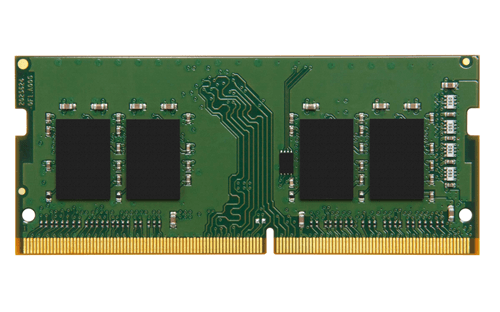
Synchronous Dynamic Random Access Memory (SDRAM) is a type of volatile memory that operates in sync with the system’s clock signal. Unlike older asynchronous memory, SDRAM performs read and write operations based on clock cycles, which allows data to move in a predictable and highly efficient manner. SDRAM stores data in capacitors that must be continuously refreshed to retain information. What makes it “synchronous” is its ability to coordinate all operations with the processor’s timing, enabling faster and more organized data access compared to earlier memory types.
SDRAM works by tightly synchronizing all memory operations with the system clock, which allows data to be accessed in a structured and predictable way. Instead of responding randomly to requests, SDRAM follows a precise sequence driven by clock cycles. Each operation—whether activating a memory row, selecting a column, or transferring data—happens at specific clock intervals. This synchronization enables the processor and memory to stay aligned, reducing delays and improving efficiency in real systems such as computers, embedded devices, and robotics controllers.
At the operational level, SDRAM uses clock cycles to manage every step of data access. When the processor requests data, the memory controller sends commands that are executed over multiple cycles. First, a row of memory is activated, then the correct column is selected, and finally the data is transferred. Although this process introduces small delays, the key advantage is consistency. Because the timing is fixed and predictable, systems can optimize performance by overlapping operations. In real-world scenarios, this is what allows smooth multitasking, faster application response, and stable performance under continuous workloads.
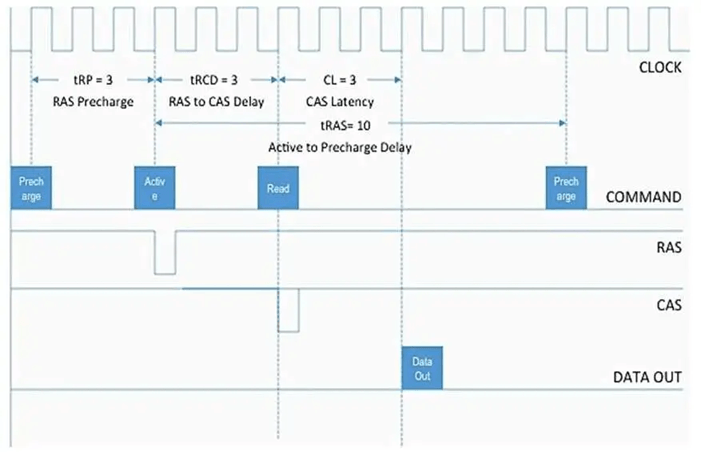
A critical factor in this process is CAS latency (CL), which defines how many clock cycles it takes for data to become available after a read command is issued. Lower CAS latency means faster access to data, which is especially important in applications that rely on quick responses, such as real-time control systems or high-performance computing. However, CAS latency must always be considered together with clock speed. For example, a higher-frequency memory module with slightly higher latency may deliver similar or even better real-world performance than a lower-speed, low-latency module. This balance is why system designers evaluate both timing and frequency rather than focusing on a single specification.
Another key mechanism that improves SDRAM efficiency is burst mode, which allows multiple data units to be transferred in a single operation. Once a memory row is opened and the first data point is accessed, SDRAM automatically continues reading or writing adjacent data without repeating the full access process. This significantly reduces overhead and increases throughput. In real systems, burst mode is essential for handling continuous data streams, such as video processing, sensor data acquisition, or memory-intensive applications. It ensures that large blocks of data can be moved quickly and efficiently without creating bottlenecks.
In practice, the combination of clock synchronization, timing control, and burst data transfer determines how well SDRAM performs under real workloads. Systems that require steady and high-speed data flow benefit the most from optimized SDRAM timing. Poor configuration, such as mismatched memory timings or high latency, can lead to slower performance, reduced responsiveness, or even instability. This is why SDRAM is not just about raw speed; it is about how effectively timing and access patterns are managed to deliver consistent and reliable performance.
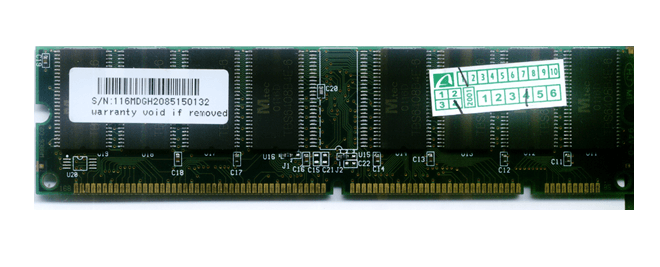
SDR SDRAM is the earliest form of synchronous memory and transfers data once per clock cycle. It was widely used in older computers during the late 1990s and early 2000s. While it introduced synchronization with the system clock, its performance is limited by today’s standards due to low bandwidth and slower speeds, typically below 133 MHz. SDR SDRAM is now obsolete for modern computing but still appears in legacy systems and older embedded designs.
DDR SDRAM improved performance by transferring data twice per clock cycle—on both the rising and falling edges of the clock signal. This effectively doubled bandwidth without increasing clock frequency significantly. DDR memory was widely adopted in early 2000s systems and marked a major step forward in efficiency. In use, DDR enabled smoother multitasking and better system responsiveness compared to SDR SDRAM, making it suitable for early multimedia applications and basic computing.
DDR2 introduced higher clock speeds and improved power efficiency by lowering operating voltage (typically 1.8V compared to 2.5V in DDR). It also increased internal prefetch, allowing more data to be processed per cycle. DDR2 was commonly used in mid-2000s desktops and laptops. In actual performance, it offered better bandwidth for applications like web browsing, office tasks, and early gaming, but higher latency somewhat limited its gains in certain scenarios
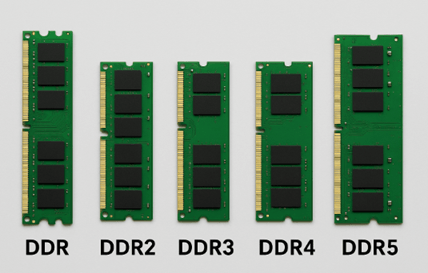
DDR3 further improved speed and reduced power consumption (around 1.5V or lower). It became the standard for many years due to its balance of performance, efficiency, and cost. With higher data rates and improved bandwidth, DDR3 supported more demanding applications such as HD video processing, gaming, and multitasking. In embedded and industrial systems, DDR3 is still widely used today because it offers stable performance and mature ecosystem support.
DDR4 brought significant improvements in bandwidth, efficiency, and reliability. It operates at lower voltage (around 1.2V), reducing power consumption while supporting much higher data rates. DDR4 is widely used in modern desktops, laptops, and servers. In real-world scenarios, it delivers better performance for heavy workloads such as data processing, virtualization, and content creation.
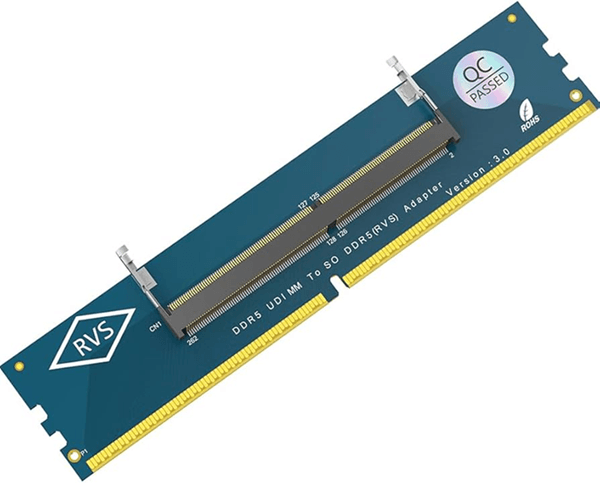
DDR5 is the latest generation, designed for high-performance computing and future-ready systems. It offers significantly higher bandwidth, improved power management, and better scalability compared to DDR4. DDR5 modules include features like on-module power management and increased memory density. In nowadays applications, DDR5 is ideal for AI workloads, advanced robotics, gaming, and data-intensive tasks. While it provides top-tier performance, it also comes at a higher cost and may not be necessary for all users depending on their needs.
| Parameter | DDR2 | DDR3 | DDR4 | DDR5 |
| Speed (MT/s) | 400 – 1066 | 800 – 2133 | 1600 – 3200 | 4800 – 8400+ |
| Voltage | 1.8 V | 1.5 V (1.35 V low-power) | 1.2 V | 1.1 V |
| Power Efficiency | Moderate (higher power consumption, more heat) | Improved (~30–40% lower power than DDR2) | High (better energy efficiency and thermal control) | Very high (on-module power management, lowest power per bit) |
| Bandwidth (Real Impact) | Low | Medium | High | Very High |
| Real-World Use (PCs) | Legacy systems only | Older desktops and laptops | Mainstream modern PCs and gaming systems | Latest high-end PCs and next-gen platforms |
| Real-World Use (Servers) | Obsolete | Legacy servers | Widely used in data centers | AI, cloud computing, high-performance servers |
| Real-World Use (Embedded Systems) | Rare, legacy designs | Still used in long-life industrial systems | Common in embedded Linux and industrial control | Emerging in advanced embedded and AI systems |
| Key Advantage | First major improvement over SDR | Better speed and lower power | Best balance of performance, cost, and stability | Extremely high bandwidth and scalability |
| Main Trade-Off | Very slow by today’s standards | Higher latency vs DDR4 | Limited future scalability | Higher cost, requires newer platforms |
| Parameter | SDRAM (DRAM) | SRAM | Flash Memory |
| Full Name | Synchronous Dynamic RAM | Static RAM | Non-Volatile Flash Memory |
| Data Storage Method | Capacitors (needs refresh) | Flip-flops (no refresh) | Floating-gate transistors |
| Volatility | Volatile | Volatile | Non-volatile |
| Speed | Medium to High | Very High (fastest) | Low (compared to RAM) |
| Latency | Moderate | Very Low | High |
| Bandwidth | High | Very High (but small size) | Low |
| Capacity | High (GBs) | Low (KBs to MBs) | Very High (GBs to TBs) |
| Power Consumption | Moderate (needs refresh cycles) | High per bit | Very Low (no refresh when idle) |
| Cost per Bit | Low | Very High | Very Low |
| Typical Use in Systems | Main system memory (RAM) | CPU cache, registers | Storage (SSD, firmware, USB drives) |
| Real-World Role | Balances speed and capacity | Ultra-fast temporary storage | Long-term data storage |
| Data Retention (Power Off) | Lost | Lost | Retained |
| Scalability | Good for large memory | Limited due to cost/size | Excellent for mass storage |
| Reliability | Needs refresh, stable when managed | Very stable, no refresh needed | Limited write cycles (wear-out) |
| Write/Erase Speed | Fast | Very Fast | Slow (especially erase cycles) |
SDRAM directly affects how fast and responsive a system feels because it controls how quickly data is delivered to the processor. During boot time, faster and lower-latency SDRAM helps load the operating system and background services more quickly, reducing startup delays. Systems using newer memory like DDR4 or DDR5 typically feel more responsive right from power-on.
In multitasking, SDRAM handle multiple applications at once. Higher bandwidth and sufficient capacity allow smooth switching between apps without lag. If memory is slow or limited, the system relies on storage-based memory, which significantly reduces performance.
For gaming and high-load computing, SDRAM improves data flow between the CPU and GPU. Faster memory helps maintain stable frame rates and reduces stuttering, especially in demanding scenes. While it may not always increase peak performance, it improves overall smoothness and consistency.
In robotics and real-time systems, SDRAM process continuous data from sensors and executing control algorithms. Low latency ensures quick response times, while high bandwidth supports uninterrupted data flow. Poor memory performance can lead to delays, affecting system accuracy and stability.
One of the most common SDRAM problems is incompatibility between the memory module and the system. This often happens when using the wrong DDR generation (e.g., DDR3 vs DDR4) or unsupported speeds. In real-world scenarios, this can lead to boot failure, no display, or the system not detecting RAM at all. The solution is to always match the RAM type with the motherboard specifications and check the supported frequency range. Using the motherboard’s qualified vendor list (QVL) can also reduce risk, especially in custom PC builds or industrial systems.
Many users assume higher MHz automatically means better performance, but high CAS latency can cancel out speed gains. For example, a high-frequency module with loose timings may perform similarly to a lower-speed module with tighter latency. This leads to slower response times in real applications such as gaming or real-time processing. The solution is to balance frequency and latency instead of focusing on one parameter. In performance-critical systems, choosing optimized timing profiles often delivers better real-world results.
Improper memory timing or unstable configurations can cause random crashes, freezes, or blue screen errors. This is common when enabling aggressive settings like XMP without proper system support. In real-world cases, systems may appear stable under light use but fail during heavy workloads. The solution is to test memory stability using stress tools and adjust timings or voltage if needed. Running memory at manufacturer-recommended settings ensures reliable operation, especially in servers or embedded applications.
Even with fast SDRAM, having insufficient capacity can severely impact performance. When RAM runs out, the system uses storage (virtual memory), which is much slower. This results in lag, slow application switching, and poor multitasking. In practical scenarios like running multiple browser tabs or heavy software, this becomes very noticeable. The solution is to upgrade RAM capacity based on workload needs—more memory often provides a bigger improvement than faster memory alone.
High-performance SDRAM, especially in gaming or server environments, can generate heat that affects stability and lifespan. Excessive heat may lead to errors or automatic performance reduction. In real-world systems, poor airflow or compact designs can worsen this issue. The solution is to ensure proper cooling through airflow optimization, heat spreaders, or system design improvements. This is especially important in industrial and embedded systems where thermal conditions are more demanding.
Modern SDRAM often relies on BIOS profiles like XMP or EXPO to reach rated speeds. If these settings are not enabled, the memory may run at lower default speeds, reducing performance. On the other hand, enabling them on unsupported systems can cause instability. The solution is to correctly configure BIOS settings based on system compatibility. For most users, enabling the correct profile improves performance instantly, but stability testing is still recommended.
In high-reliability systems such as servers or robotics, SDRAM errors can lead to data corruption, affecting system accuracy and safety. While rare in consumer systems, this becomes critical in industrial environments. The solution is to use ECC (Error-Correcting Code) memory, which detects and corrects errors automatically. This adds reliability, especially in systems where data integrity is essential.
In embedded or robotics applications, inefficient memory usage can reduce SDRAM performance even if the hardware is capable. Random access patterns prevent effective use of burst mode, lowering throughput. In real-world systems like vision processing, this can create bottlenecks. The solution is to optimize software design by using sequential data access and efficient buffering techniques to maximize SDRAM efficiency.
Using different RAM modules with varying speeds, sizes, or timings can cause the system to downclock to the slowest module or become unstable. This is a common issue in upgrades where users add new RAM to existing modules. In practice, this results in reduced performance or compatibility issues. The solution is to use matched memory kits with identical specifications. This ensures stable operation and allows the system to run at optimal performance.
SDRAM is evolving to meet the growing demand for faster and more efficient systems. Newer generations like DDR5 provide higher bandwidth and better performance for data-heavy applications such as AI, cloud computing, and real-time processing. Looking ahead, DDR6 and beyond are expected to push memory performance even further, with significantly higher speeds and improved efficiency. While these technologies are still in development, they highlight the direction SDRAM is taking: faster, more efficient, and better suited for future computing demands.

 Catalogue
 FPGA / CPLD
 Memory
 MOS
MOS  MCU
MCU  DSP
DSP OCEP
OCEP Secondary
  Other
Other 


